


01
Deine Aptora-Adresse
Jedes Konto bekommt eine eigene E-Mail-Adresse für Jobangebote.
Discover. Human. Capability.
Erstelle und teile deinen Lebenslauf. Finde passende Projekte und Festanstellungen in Deutschland, Österreich und der Schweiz.
Neue Jobs
Produkt
Drei Ansichten aus der App, vom eigenen Profil bis zur Einigung mit einem Kunden. Die Nummern zeigen, worauf es ankommt.
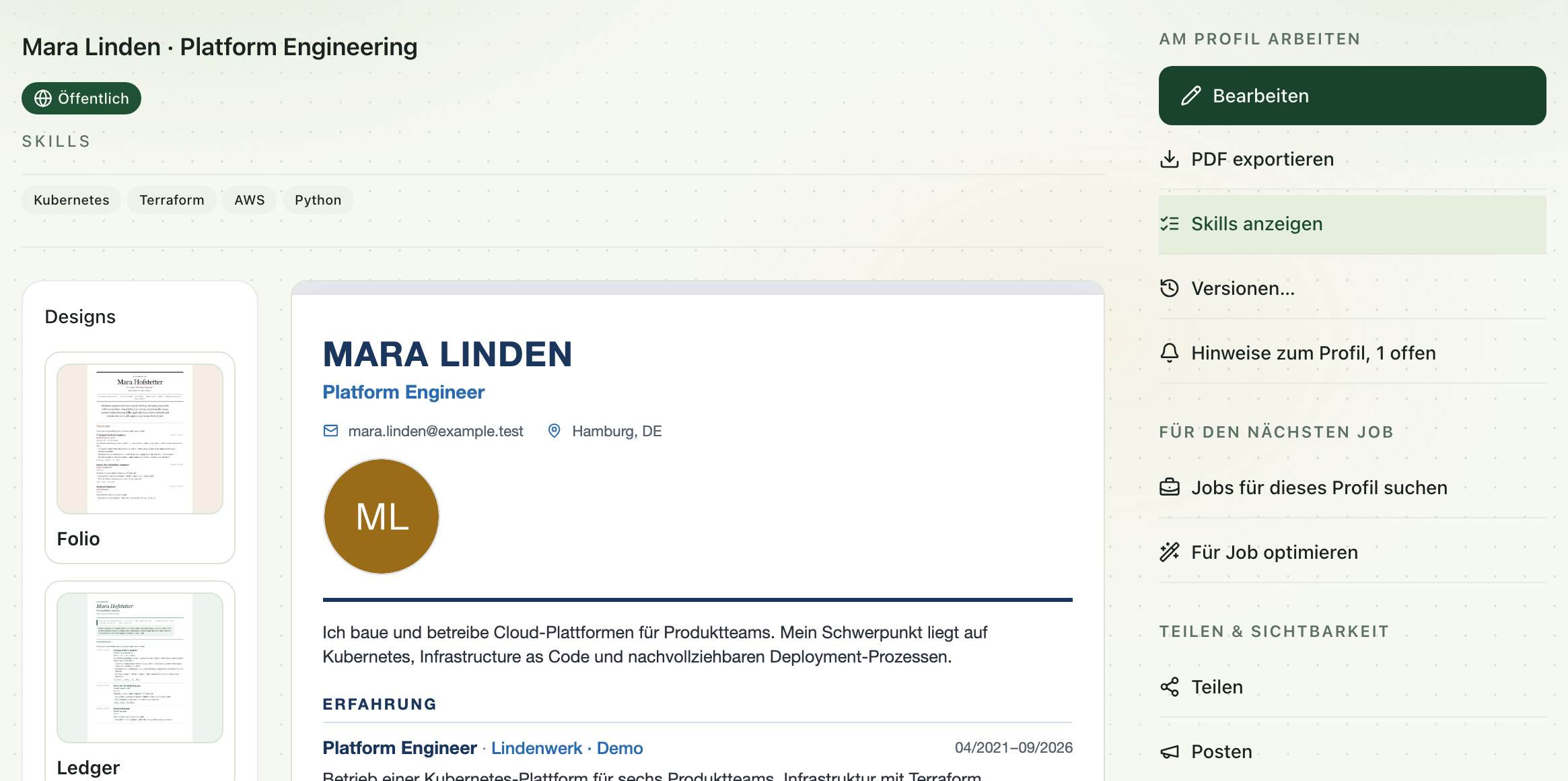
Dein Lebenslauf gehört dir. Als Aptora-Profil pflegst du ihn an einer Stelle und nutzt ihn für Matching, Bewerbungen, Freigabelink und PDF.
Im Editor liest Aptora einen vorhandenen Lebenslauf aus PDF, Screenshot oder Foto ein. Gespeichert wird erst, wenn du die Angaben geprüft hast.
Was hier steht, zählt im Matching am stärksten. Die Liste ist die Grundlage für die Treffer im nächsten Schritt.
Nennt eine Station einen Skill, der nicht in der Liste steht, schlägt Aptora ihn mit der Fundstelle vor, hier GitOps. In die Liste kommt er erst, wenn du ihn aufnimmst.
Für eine Anzeige entsteht eine zugeschnittene Kopie aus deinen vorhandenen Angaben. Dein Profil bleibt unverändert.
Statt eines weiteren PDFs schickst du einen Link auf den aktuellen Stand deines Lebenslaufs. Wie auffindbar dein Profil ist, entscheidest du.
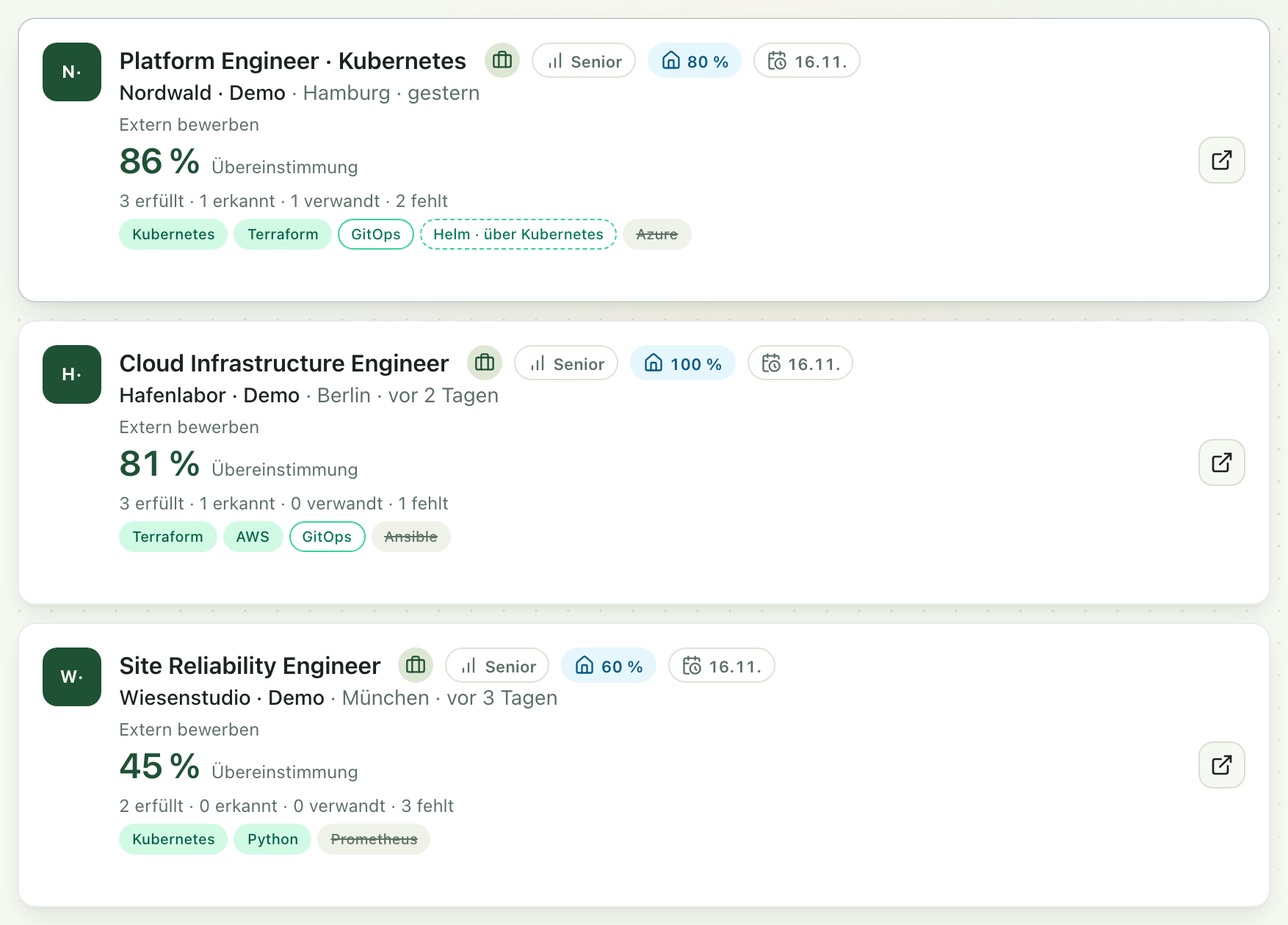
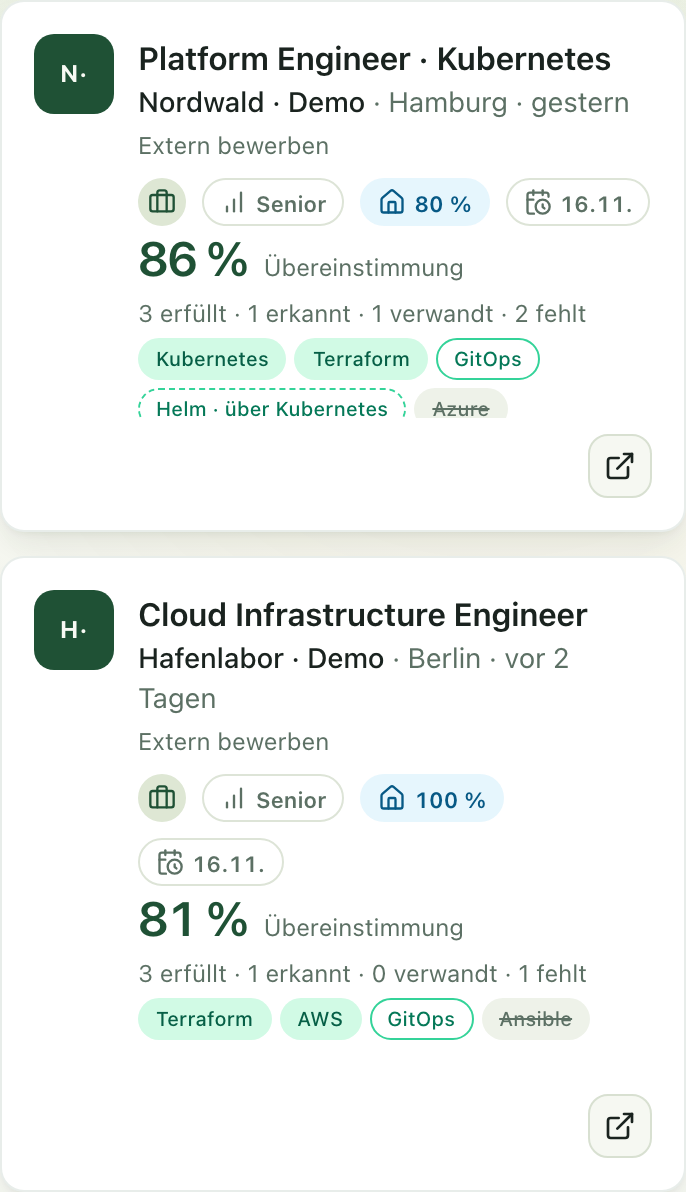
Aptora vergleicht die Anforderungen jeder Jobanzeige mit deinem Lebenslauf. Der Prozentwert misst diese Überschneidung, nicht dich.
Pflicht-Anforderungen der Anzeige zählen stärker als optionale. Haben Anzeige und Profil dieselbe Rolle oder eine direkte Ober- oder Unterrolle, kommt ein fester Zuschlag dazu. Ein Abstand in der Seniority senkt den Wert.
Ein Skill, den dein Profil in der Liste führt, zählt voll.
Steht ein Skill nur in einer Station oder einem Projekt, zählt er schwächer als ein Eintrag in der Liste.
Helm ist über Kubernetes abgedeckt, eine geprüfte Verbindung im Skill-Katalog. Auch das zählt schwächer als ein direkter Beleg.
Die Anzeige verlangt Azure, dein Profil nennt es nicht. Wie stark das wiegt, hängt davon ab, ob die Anzeige es als Pflicht oder optional führt.
Mehr dazu: Wie ein Treffer entsteht · Rankingparameter
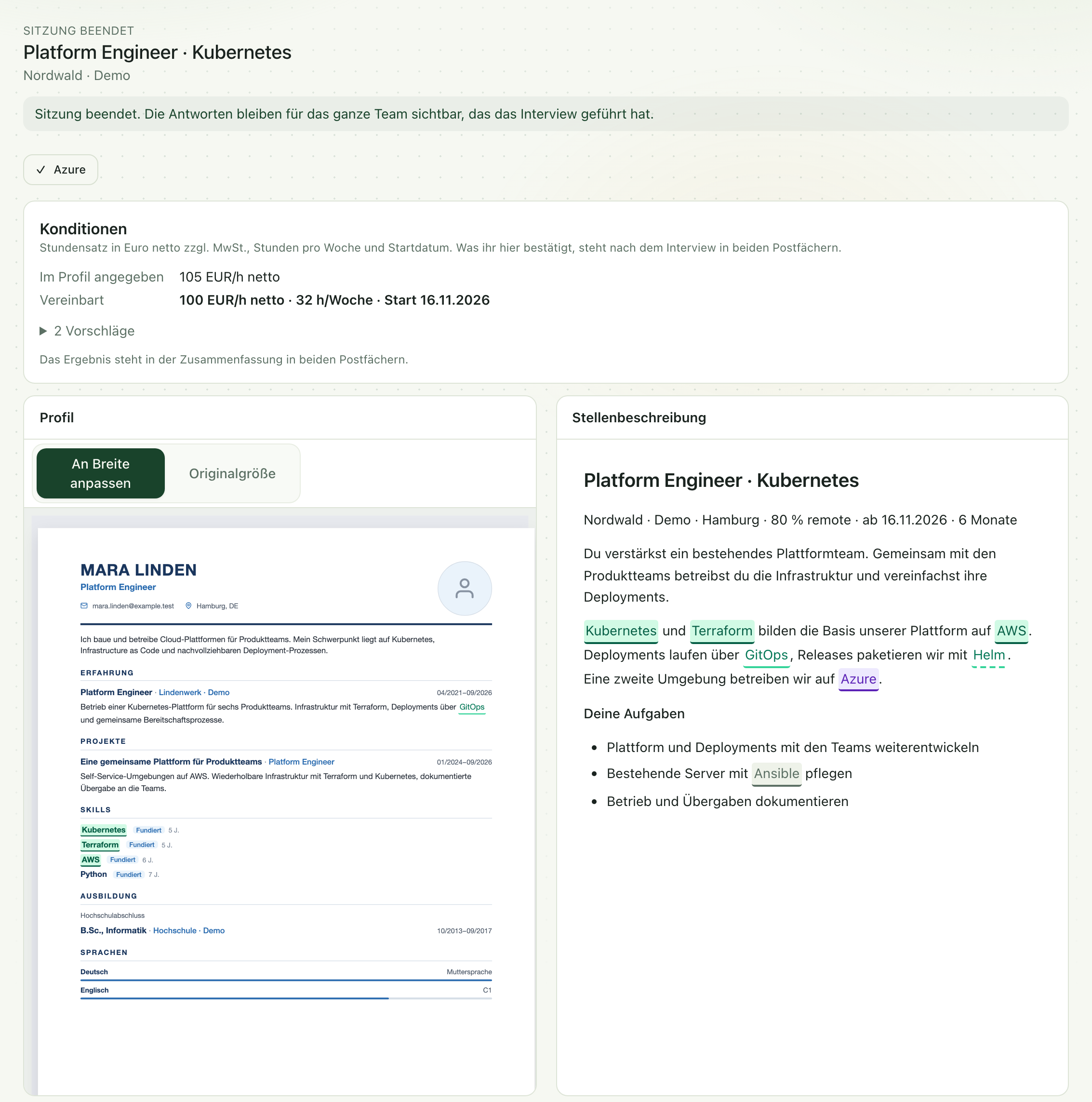
Braucht ein Kunde kurzfristig Unterstützung, legt er deinen Lebenslauf neben seine Anforderung. Was offen ist, klärt ihr per Skill-Anfrage oder im Live-Interview. Die Aufnahme zeigt ein beendetes Live-Interview aus deiner Sicht.
Kubernetes steht in deiner Skill-Liste und in der Anforderung. Beide Stellen sind markiert.
Helm belegt dein Profil nur über Kubernetes. Die gestrichelte Markierung zeigt das.
Ansible kommt im Profil nicht vor. Das sagt nichts darüber, ob du den Skill beherrschst. Es ist ein offener Punkt.
Azure fehlte im Profil. Im Interview hast du es selbst bestätigt, im Vergleich steht es danach als persönliche Antwort. Schriftlich geht das per Skill-Anfrage.
Stundensatz, Stunden pro Woche und Startdatum: Eine Seite schlägt vor, die andere bestätigt. Das Vereinbarte steht danach in beiden Postfächern und auf der Shortlist des Teams.
Mehr dazu: Direktvergleich · Skills und Konditionen klären
WENIGER SORTIEREN. MEHR ÜBERBLICK.
Lass die E-Mails deiner Job-Suchagenten direkt bei Aptora ankommen — und bewirb dich mit wenigen Klicks. Alles dazwischen ist Aptoras Aufgabe.
Jedes Konto bekommt eine eigene E-Mail-Adresse für Jobangebote.
Trag die Adresse bei deinen Jobportalen ein — oder leite einfach weiter, was ohnehin in deinem Postfach landet.
Aptora liest jede Mail aus und macht daraus einzelne Jobs, die du filtern und sortieren kannst.
Jeder Job wird gegen deinen Lebenslauf bewertet — mit Begründung, nicht nur mit einer Zahl.
Link zum Lebenslauf, Tagessatz und Anschreiben stehen bereit. Abschicken, fertig.
DEINE INHALTE. DEIN AUFTRITT.
Zurückhaltend für die Konzernbewerbung, auffällig für die Agentur, nüchtern für die Ausschreibung: Wähl das Design, das zur Stelle passt — dein Inhalt bleibt genau so, wie du ihn geschrieben hast. Jedes Design liefert auf Knopfdruck ein druckfertiges PDF, und es kommen laufend neue dazu.
Designs in der App ausprobierenDesignskizzen · derselbe Lebenslauf
CLAUDE · CURSOR · CHATGPT
Verbinde Aptora mit dem Client, den du bereits nutzt. Lebensläufe anlegen, Jobs durchsuchen und Änderungen prüfen — direkt aus dem Chat.
Verbindung einrichtenSICHTBAR, WENN DU ES WILLST.
Deins ist nur dabei, wenn du das willst — und nur, wenn es der Suche etwas zu lesen gibt. Das sind die fünf Dinge, auf die sie schaut.
Talente entdeckenDen Schalter legst du selbst um. Du entscheidest, ob dein Profil in der Suche auftaucht, und du kannst es jederzeit wieder herausnehmen.
MEHR RAUM FÜR DEINE ARBEIT.
Vom ersten Entwurf bis zur abgeschickten Bewerbung — das nimmt dir Aptora ab.
Zieh ein PDF hinein, einen Screenshot oder ein Handyfoto. Aptora liest Stationen, Fähigkeiten und Ausbildung heraus. Dein Lebenslauf wird als Profil gespeichert, das du sofort weiterbearbeiten kannst.
PDF · Screenshot · FotoAptora findet deine Fähigkeiten im Fließtext, bringt unterschiedliche Schreibweisen auf einen Nenner und weiß, was zusammengehört. Wer Kubernetes kann, sollte Docker nicht extra aufzählen müssen — und muss es hier auch nicht.
Gefunden statt eingetipptJeder Job wird nach Titel, deinen Fähigkeiten und deinen Wünschen bewertet. Du siehst, welche Anforderung du erfüllst, welche über eine verwandte Fähigkeit abgedeckt ist und welche wirklich fehlt. Deine Wünsche sagst du in einem Satz: „auf jeden Fall Rust“.
Titel · Fähigkeiten · WünscheLink zum Lebenslauf im passenden Design, Tagessatz und Anschreiben sind vorbereitet. Alles Abgeschickte bleibt an einem Ort — du weißt jederzeit, wo du dich beworben hast und was daraus geworden ist.
Wenige Klicks pro BewerbungVeröffentliche deinen Lebenslauf unter einer eigenen Adresse und sieh, wie oft er geöffnet wird. Jede Änderung bleibt erhalten — du kommst jederzeit zurück auf die Fassung von letzter Woche.
Öffentlicher Link · Statistik · VerlaufENTDECKEN
Ob du an deinem Lebenslauf arbeitest, ein Team aufbaust oder Aptora in deine Software einbindest.

Bring mit, was du kannst. Aptora bringt Struktur hinein.
Mein Profil anlegen